
Should you Reboot your Modem?
In January of 2014, European Space Agency scientists were in for a big scare. Their billion-dollar comet lander, Rosetta, was set to wake up after 31 months of hibernation, during which it had powered down to conserve energy. If it didn’t wake up, the ESA had potentially just thrown tons of money into a project that wouldn’t yield any data.
They anxiously awaited for Rosetta to wake up. After a grueling 18 minutes, Rosetta finally sent a signal—and tweeted “Hello world!” Everyone let out a sigh of relief.
What had it been doing for those 18 minutes? Power cycling. Twice. Rosetta was programmed to reboot itself in case of a situation like this. The systems weren’t syncing up with each other, which could have been disastrous. But in the end, it was nothing a couple reboots couldn’t fix—even though there were millions of dollars on the line. Power cycling saved the day.
So next time you call up your ISP to ask what the heck is going on, don’t be surprised if the first thing they ask you is: “Have you tried turning it off and on again?” There’s a reason why this phrase has become the standard question for tech problems big and small, and it’s not because it’s great meme fodder.

It’s because rebooting, restarting, and just plain “turning it off and on again” will, in many cases, actually get you back up and running.
Power Cycling 101
“Turning it off and on again,” or power cycling for short, essentially just means disconnecting something—like your modem or router—from its power source.
Why it works is less about solving an actual problem, and more about providing a convenient work-around for you, the end-user. The actual reason why you can’t, say, connect to your WiFi is “likely hard to reproduce, diagnose and fix,” as Philip Remaker recently explained on Quora.
Power cycling works, Remaker goes on to say, because computers and modems and routers and even cellphones are all massive collections of “state machines”—they contain a wide variety of programs that need to run to generate your operating system. Usually those processes will cooperate, but occasionally “some combination of states will toss the system into unexpected array.” When you reset, you’re pulling the metaphorical fire alarm, ending every single process, and returning the system to a “known, base state.”
But, What Does That Have To Do With My Internet?
When it comes to your cable modem or fiber ONT, there are many processes happening behind the scenes that can break down with time. The two most popular technologies for internet access delivery today are DOCSIS, which is used to deliver coax based cable services, and GPON, which is used to deliver fiber based services. Both DOCSIS and GPON operate on a point-to-multipoint system. In practical terms, this means that on your ISP’s side there may be one device on the back-end talking to dozens of customers just like you. We’ll refer to this device as the “Operator”.
Because the operator has to talk to multiple modems at any one time, both DOCSIS and GPON allocate time-slots to each end user and send instructions to only upload data when it’s their turn. Unfortunately, as modems come online or offline, it’s possible for those time-slots to collide with each other. When that happens, it may appear as if your internet is down, because the Operator didn’t know to interpret the data it was sent.
Similarly, the Operator is expecting your data to come in a certain format. If, for whatever reason, the connection between your home/office and the Operator becomes interrupted, even if for a second, that data format might become corrupt. All ISPs are different, but when the Operator receives malformed data, it might quarantine your modem. This means it will reject all data from that modem until it’s restarted and clean data is exchanged.
Another possible cause of connectivity issues is Ethernet errors. Ethernet errors occur when your computer and/or modem begin to discard data being sent to one another. Devices look to each other to determine how fast they’re able to transmit data (speed), and whether or not they can send/receive data at the same time (duplexing). If there is an Ethernet error, an easy way to restart that connection is to unplug the cable from both ends, or simply restarting your modem or router!
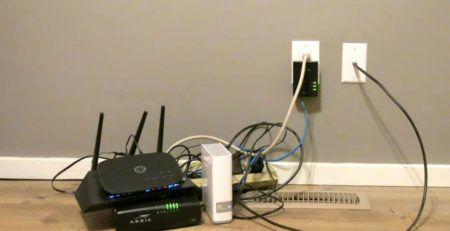
Others have come up with more creative ways to solve the power cycling problem.
How Do You Do It?
In most cases, it’s as simple as unplugging the device, waiting 30 seconds, and plugging it back in. If you’re renting a modem from your ISP, you can probably find a tutorial on their site that teaches you what button’s what, in case you’re curious.
But there’s one important thing to remember: reboot, don’t reset! There might be a reset button on your machine, but don’t confuse the two. If you reset, your modem will default to the factory settings. All your customized settings, like your network name and password will be erased, and the reboot will take up even more of your time.
Some people even have even gone to the extreme of buying a timer to plug into your outlet that will program the power to disconnect to the device. For example, a timer might go off and power cycle devices from 4:15 to 4:16 am, when no one’s at the office and using the connection (hopefully).
What If That’s Not the Problem?
Of course, rebooting your modem isn’t a cure-all. Recurring issues with your connectivity usually imply something more than a power cycle is required, but it can be tricky to diagnose exactly what the problem is. Is the problem on your end? Or the ISPs?
For example, there might be a power outage on your ISP’s end, or a problem with connectivity in your building. This summer, Comcast issued a $5 refund to any user in California who asked for one because of a three-hour Monday blackout. The failure, it turns out, was with a single piece of hardware on Comcast’s end. No matter how many times people rebooted their modems, they were out of luck.
Of course, there are still additional problems that could be happening, like weather, or a problem with the device itself. But most of the time, it’s a highly technical problem with one of the systems inside the modem. You could spend a really long time on the phone with an IT person to figure out what it is. Or you could just reboot.
reprinted from pilotfiber.com




LEAVE A COMMENT
You must be logged in to post a comment.